
MiniMax H3 AI Video Generator - Omnimodal Reference, Native Stereo, and 2K
MiniMax H3, released by MiniMax on July 31, 2026, is an omnimodal video model. It reads text, images, video, and audio as one context and writes the picture with native stereo in the same pass. A clip runs 4–15 seconds at 24 fps, at 768p or 2K (1440 short side). Instruction following, on-screen type and brand marks, and video-to-video motion transfer are the parts that hold up in ads, brand films, e-commerce, product design, UI motion, and games.
Use cases: Brand Films | Ads & E-commerce | Game UI & Product Interfaces | Motion Posters | Multilingual Spots | Character & Camera Reference
Try MiniMax H3 for Free Now · MiniMax H3 Max 480p starts at 7 VA Coins per second (about 7 cents). Sign up and get 32 VA Coins.

MiniMax H3 Core Features
🎬 One pass over image, video, and sound
A real brief is rarely one sentence of picture description. MiniMax H3 takes images, video, and audio together, then uses plain language to say how each file relates to the finished shot. The prompt for the clip below is: follow the Hitchcock camera move in video 1, have the person in image 2 sing, and take the voice from audio 3.
Video 1, the camera reference:
Image 2, the person reference:
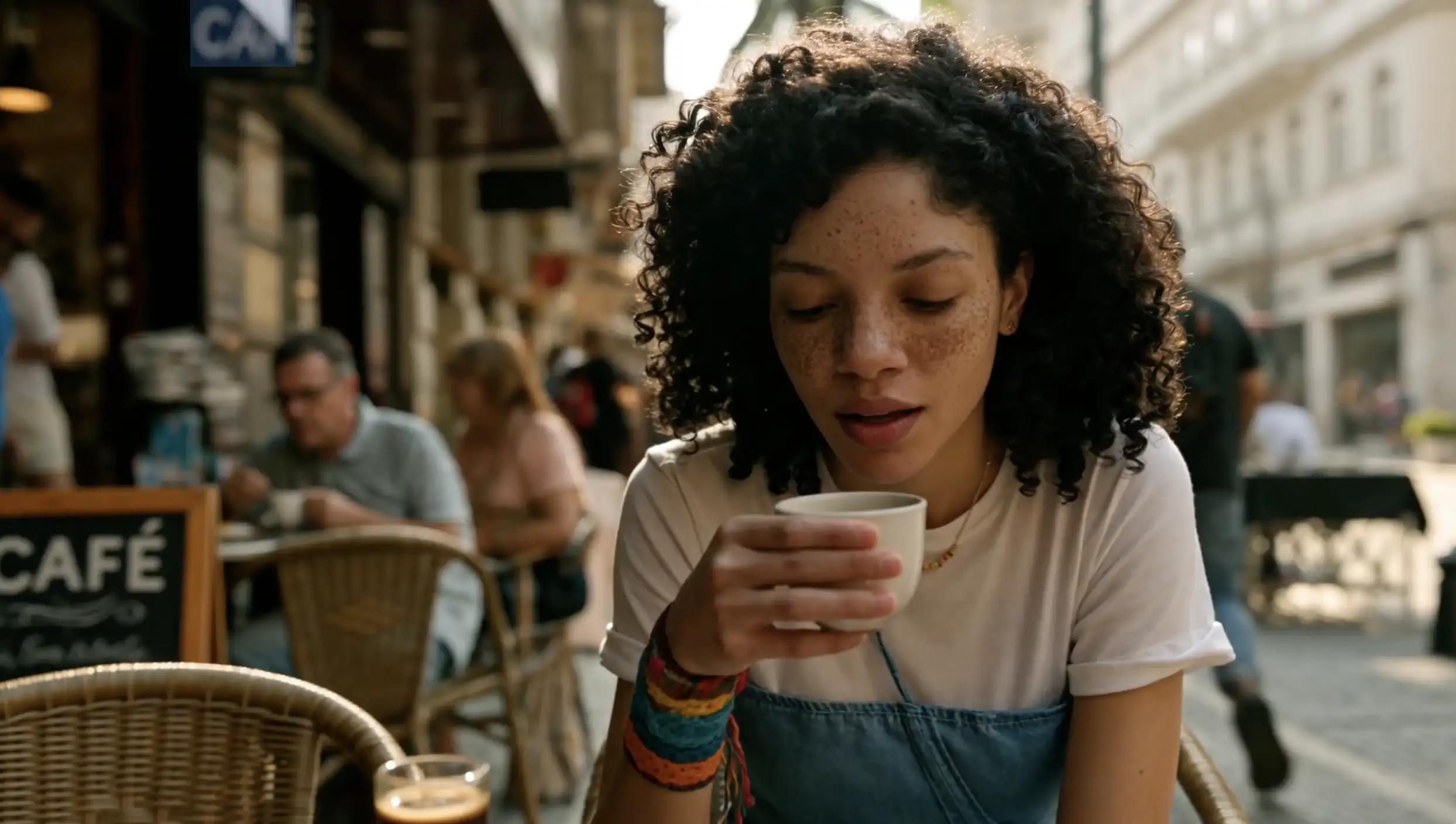
Generated clip:
🖼️ 768p and 2K, without a separate upscaler
768p is available now. Aspects from 16:9 to 9:16 use a 768-pixel short side. Wider or taller frames target about 1 million pixels, so 21:9 comes out at 1536×672. A 768p result can be upgraded to 1440p.
The recommended tier is 2K, short side 1440. The same rule applies: 16:9 through 9:16 keep a 1440 short side, while 21:9 is 2976×1248, about 3.7 million pixels. That 2K pass is In-context Regeneration. H3 regenerates its own lower-resolution result with the original multimodal context still attached, so small type and fine detail are not invented by a detached upscaler.
🔊 Native stereo on every output
Voice, effects, and music are modeled with the picture. The file is native stereo, not a silent render with a soundtrack glued on later. Write the spoken lines, the effects, and whether you want music. If you do not want a score, say so at the end of the prompt.
🎛️ Text-to-video, first and last frames, omni reference
Three entries cover the usual jobs. On the API they map to FL2VA and Ref2VA.
| Entry | Use it when | Inputs |
|---|---|---|
| Text to video | You have no reference files and the prompt has to build the subject, place, and action | No uploads. Spell out appearance, setting, action, and style |
| First and last frames | You need to lock the opening or closing image | 0, 1, or 2 images, 256–5760 on a side, aspect from 5:2 to 2:5. With two images the model fills motion, light, and sound and does not add cuts on its own |
| Omni reference | Identity, objects, action, camera, voice, or an edit of an existing clip must stay locked | Up to 9 images, 3 videos, and 3 audio clips, 12 files at most. Audio must ride along with an image or a video |
Text-to-video and omni reference can output 21:9, 16:9, 4:3, 1:1, 3:4, or 9:16. Omni reference can also leave the aspect on automatic. First-and-last-frame output follows the source image.
Each reference video or audio clip is 2–15 seconds. Total video duration and total audio duration are each capped at 15 seconds. Video may be H.264 or H.265, with AAC or MP3 inside the file. Images may be JPG, JPEG, PNG, WebP, HEIC, or HEIF. Standalone audio may be WAV or MP3. One video stays under 50MB, one image under 30MB, one audio clip under 15MB. Prompts stay within 7,000 characters.
Speech is most reliable in 11 languages, including Chinese, English, Japanese, Korean, French, German, and Spanish. Arabic, Thai, Indonesian, Hindi, and others are worth a test when the spot has to travel. That is the path for overseas ads, cross-language shorts, and localized product films.
MiniMax H3 Specifications
| Item | MiniMax H3 |
|---|---|
| Released | July 31, 2026, by MiniMax |
| Length | 4–15 seconds |
| Frame rate | 24 fps |
| Resolution | 768p, upgradeable to 2K (1440 short side) |
| Audio | Native stereo on every output |
| Aspect | 21:9, 16:9, 4:3, 1:1, 3:4, 9:16; automatic in omni reference |
| Omni reference cap | 9 images + 3 videos + 3 audio clips, 12 files at most |
| Prompt | Up to 7,000 characters |
MiniMax H3 Max
MiniMax H3 Max is a fast video model post-trained on the open weights of MiniMax H3 (Hailuo 3). It is built for 5–15 second clips at 480p, 768p, or 1080p, with native audio. The ceiling is 1080p. There is no 2K tier. The weights are not public and are hosted only on fal. On fal's inference stack, a 5-second clip can come back in about 3 seconds.
Use it to swap a camera move, try an action, or see whether a frame holds. When the direction is set and the delivery needs 2K, go back to MiniMax H3.
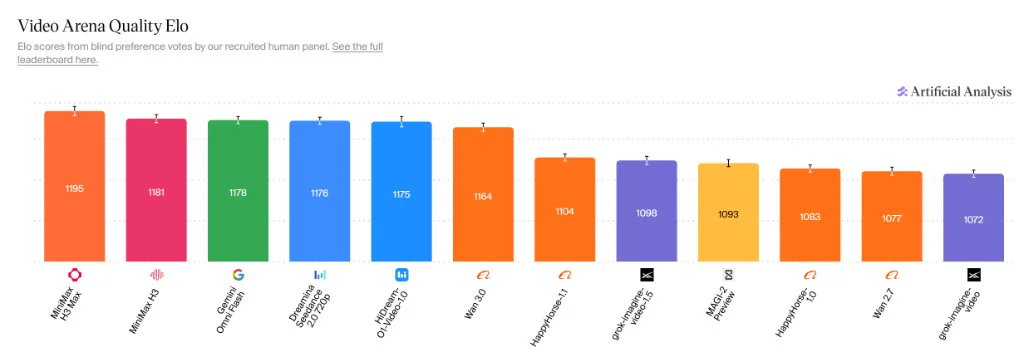
The Video Arena Quality Elo scores below come from blind preference votes. In this chart MiniMax H3 Max is at 1195 and MiniMax H3 at 1181, ahead of Gemini Omni Flash (1178) and Seedance 2.0 720p (1176).
| MiniMax H3 (base) | MiniMax H3 Max | |
|---|---|---|
| Training | MiniMax | Post-trained by fal on the open MiniMax H3 weights |
| Weights | Open | Not public, hosted only on fal |
| Length | 4–15 seconds | 5–15 seconds |
| Resolution | Native 768p, then Regenerate-2K up to 2K | 480p / 768p / 1080p, no 2K |
| Audio | Native stereo | Native audio |
| Speed | Standard diffusion | About 3 seconds back for a 5-second clip |
| Stronger at | Final delivery and 2K output | Fast iteration and creative tests |
Choose MiniMax H3 for a high-resolution delivery. Choose MiniMax H3 Max to test a direction quickly. On AIGCVA, H3 Max at 480p starts at 7 VA Coins per second (about 7 cents), and new accounts receive 32 VA Coins.
MiniMax H3 vs Seedance 2.5 and Gemini Omni Flash
| MiniMax H3 | Seedance 2.5 | Gemini Omni Flash | |
|---|---|---|---|
| Released | MiniMax, July 31, 2026 | ByteDance Seed, July 31, 2026 | Google, I/O 2026 |
| Length | 4–15 seconds | 4–30 seconds, plus multi-round extension | 10 seconds |
| Resolution | 768p and 2K (1440 short side) | Up to 1080p | 720p |
| Audio | Native stereo every time | Joint audio-video generation | Native speech, music, and effects |
| References | Up to 9 images + 3 videos + 3 audio clips | Up to 30 images + 10 videos + 10 audio clips | Up to 10 images + 3 videos |
| Stronger at | Omnimodal reference, motion transfer, on-screen type and brand, first and last frames | 30-second stories, clay-render blocking, timestamp edits | Knowledge-grounded scenes, conversational edits |
For a single pass longer than 15 seconds, see Seedance 2.5. To revise a clip in conversation, see Gemini Omni Flash.
Where MiniMax H3 Fits
🎬 Brand films and title sequences
Trailer pacing, title cards, and brand names can be written into the same generation. If a line of type must be exact, put the words in the prompt.
🎮 Game UI and product interfaces
Menus, loadout panels, page scroll, and hover states can be written as a timeline. Button labels belong in the prompt as the exact string, once.
📰 Motion posters
Keep the frame, palette, and layout of the still, and let the picture and the type move. Add a sound for the type as it enters.
🛍️ Ads and e-commerce
Product turns, claim supers, and vertical performance spots. Put label copy in quotes and say it must not repeat or misspell.
How to Create a Video with MiniMax H3
1. Open AIGCVA
Go to the AIGCVA app and select MiniMax H3.
2. Pick an entry
No files means text-to-video. One opening or closing still means first and last frames. A person, an action, a voice, or an existing clip that all have to agree means omni reference.
3. Write the prompt in three parts
Say what each file is for, then lock the subject, place, event, and tone in one sentence, then walk the shots with what should appear and what should not. Number uploads as @image1, @video1, and @audio1 in the order you attached them.
4. Set the delivery
Choose a length from 4 to 15 seconds. Aspects are 21:9, 16:9, 4:3, 1:1, 3:4, or 9:16, and omni reference can pick automatically. Resolution is 768p or 2K.
5. Change one thing on the next pass
When the first take is pointed the right way, the next prompt should move one object, one line, or one light, and restate the face, product, and camera that must stay.
MiniMax H3 Best Practices
- Name every upload: person, action, camera, voice, first frame, last frame, or an edit of this video. An unlabeled file is a guess.
- Match line length to shot length. A long speech inside a 3-second shot breaks the mouth. If one sentence crosses a cut, say which shot it starts in and which shot it continues in.
- Brand names, buttons, and titles that must be readable go in quotes, once. If type comes out garbled, supply the words as a reference image and say to read that file as a picture, not as text.
- A one-take shot should stay one passage. Do not also build a shot list. For an orbit, write truck left plus pan right, or the reverse, instead of the word orbit alone.
- Prefer visible framing, action, light, and sound over metaphor. If you do not want music, say not to add background music at the end.
- When a clip must sing or reuse a recording, paste the lyric or the spoken line as well.
MiniMax H3 Prompt Examples
First and last frames, no extra cuts
@image1 is the first frame. @image2 is the last frame.
Fill the motion and light between them. Do not cut.
The person walks from standing with a cup to sitting by the window.
Only footsteps and rain outside. Do not add background music.
Vertical product spot
15 seconds, 9:16. @image1 is the product reference. Lock the bottle shape and the label.
White cyclorama. The product turns once and ends on a front close-up.
The only on-screen words are "MORNING DEW", shown once, spelled exactly, not repeated.
Edit a clip inside omni reference
Edit @video1. Keep the camera, the person's action, and the rest of the scene.
Replace the newspaper with a green hardcover book, replace the chair with a red sofa, and remove the sunglasses while keeping the face clear.
Text only, from space to action
15 seconds, 16:9. Naturalistic documentary, cinematic light.
0–5s: wide shot, a reed marsh in morning fog.
5–11s: medium shot, a white crane stands on one leg in shallow water and slowly turns toward the lens.
11–15s: close-up, backlight on the mist and the feather edge. Water and a distant bird call only. No background music.
MiniMax H3 FAQ
What is MiniMax H3?
MiniMax H3 is the omnimodal video model MiniMax released on July 31, 2026. It understands a context made of text, images, video, and audio, then outputs picture and native stereo in one pass, instead of splitting text-to-video, image-to-video, voiceover, and editing into separate tools.
How long and how sharp can one MiniMax H3 clip be?
A single generation runs 4 to 15 seconds at 24 fps. At 768p, aspects from 16:9 to 9:16 use a short side of 768 pixels; wider or taller frames target about 1 million pixels, so 21:9 is 1536 by 672. That tier can be upgraded to 1440p. The recommended 2K tier uses a short side of 1440, so 21:9 is 2976 by 1248.
How many references can omni mode take?
Omni reference accepts up to 9 images, 3 video clips, and 3 audio clips, with no more than 12 files in total. Each video or audio clip is 2 to 15 seconds, and the videos together, and the audio clips together, each stay within 15 seconds. Audio has to be submitted with an image or a video. It cannot be uploaded alone.
Is the audio added after the picture?
No. Every MiniMax H3 output includes native stereo. Voice, effects, and music are generated in the same pass.
When should I use text-to-video, first and last frames, or omni reference?
Use text-to-video when you have no references, and describe the subject, place, action, and style in concrete terms. Use first and last frames to lock the opening or closing image with 1 or 2 pictures. The model fills the motion, light, and sound between them and does not insert extra cuts. Use omni reference when identity, action, voice, or camera movement must be locked together, and state what each file is for. On the API, the first two modes are FL2VA and omni reference is Ref2VA.
How do the open weights differ from the hosted model?
The open weights generate locally at a native 768p short side. The hosted model and API add two server stages. H3-Context-IR turns text, image, video, and audio instructions into a representation the model follows more reliably. H3-Regenerate-2K sends the 768p result back through the model with the original context and regenerates a short side of 1440. The weights use the MiniMax H3 community license, royalty-free for research and commercial use. A commercial product with annual revenue above 20 million US dollars needs separate written permission, the product UI must credit MiniMax H3, and outputs and weights may not be used to train other non-H3 models. Weight downloads currently exclude the EU, the UK, the US, and South Korea. On AIGCVA you use the hosted model and do not deploy it yourself.
How should I choose between MiniMax H3 and MiniMax H3 Max?
MiniMax H3 Max is a fast variant post-trained on the open MiniMax H3 (Hailuo 3) weights. Clips run 5 to 15 seconds at 480p, 768p, or 1080p with native audio, and there is no 2K tier. The weights are not public and run only on fal. A 5-second clip can come back in about 3 seconds. Use MiniMax H3 for 2K delivery, and MiniMax H3 Max to test a direction quickly. On AIGCVA, H3 Max at 480p starts at 7 VA Coins per second (about 7 cents), and new accounts receive 32 VA Coins.
Is MiniMax H3 free on AIGCVA?
New accounts receive 32 VA Coins. MiniMax H3 Max at 480p starts at 7 VA Coins per second (about 7 cents). For a higher quota, purchase more VA Coins.
Can videos generated with MiniMax H3 be used commercially?
Yes. Videos generated through AIGCVA support commercial use. See the platform terms of service for the license details.
MiniMax H3 Technical Advantages
- One model for the job: text-to-image, text-to-video, text-to-audio, reference, and editing share a model, and language states how the files relate to the cut
- Native stereo: voice, effects, and music are generated with the picture, including how sound sits across shots
- 2K by regeneration: In-context Regeneration reuses the base model and the original context, so small type is not guessed by a separate upscaler
- H3-VAE: higher compression yields about a 4× sequence-length saving, which is what makes native 2K practical
- Motion transfer: a reference video can lock camera or action while an image and an audio clip replace the person and the voice
- MiniMax's published cost position: the hosted service defaults to 2K, at under one third of mainstream per-second prices, and 768p is about half of mainstream 720p. AIGCVA bills in VA Coins
Start Creating with MiniMax H3
Say the shot with text, pictures, video, and sound in one brief:
🎬 Try MiniMax H3 for Free Now · MiniMax H3 Max 480p starts at 7 VA Coins per second (about 7 cents). Sign up and get 32 VA Coins.